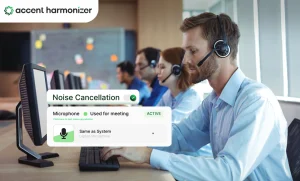

Enterprise contact centers do not have a communication volume problem. They have a semantic clarity and speech intelligibility problem. When a customer fails to understand an agent’s pronunciation, key numbers, or technical instructions, the conversation loses momentum.
At scale, these micro-delays create a linguistic friction tax across your entire operational envelope. Repeated clarification events inflate handling times, drive up supervisor escalations, and drag down customer satisfaction (CSAT).
For senior operations leaders and contact center technology leads, accent neutralization software presents a compelling fix. However, introducing real-time voice processing into a live telephony stack carries significant architectural, operational, and performance risks. Evaluating this software requires looking beyond promotional claims to test five critical operational gates before approving a production pilot.
What Is Accent Neutralization Software?
Accent neutralization software uses real-time artificial intelligence to adjust specific speech characteristics that impede intelligibility. The goal is to improve mutual comprehension between agents and customers while preserving the speaker’s original voice identity, natural inflection, and emotional tone.
Industry terminology remains fragmented across vendor marketing. Depending on the product or deployment model, buyers encounter several overlapping terms:
- Accent Neutralization: Adjusts problematic phonemes to align with the target listener’s regional expectations without altering the underlying voice identity.
- Accent Conversion: Rewrites broader acoustic profiles, sometimes shifting speech entirely into a synthetic voice model.
- Accent Harmonization: Real-time speech-pattern adjustment focused on natural intelligibility, voice identity retention, and sub-200ms processing.
- Accent Reduction: Traditionally refers to human-led, training-based speech coaching, though increasingly co-opted by software vendors.
- Accent Changer: Consumer-grade software designed to mask or transform voices, generally lacking enterprise latency, security, or audio standards.
Regardless of the label, enterprise-grade software must process bidirectional audio dynamically, eliminating comprehension barriers during live calls without introducing noticeable acoustic artifacts or call delays.
How It Works: The Audio Signal Flow
Real-time accent neutralization operates at the audio layer rather than deep within the core telephony network.
- Audio Capture: The software intercepts raw audio from the agent’s headset at the local endpoint.
- Phonetic Analysis: Neural networks analyze incoming audio frames, identifying specific phonemes, pitch contours, and timing markers.
- Targeted Adjustment: The processing engine modifies selected acoustic features—adjusting localized pronunciation or stress—while preserving core vocal formants, pitch variance, and emotional dynamics.
- Signal Synthesis: The system reconstructs the processed audio stream into a clean, natural-sounding voice signal.
- Telephony Transmission: The modified audio passes into the CCaaS/SIP application and over the network to the customer.
| Accent Harmonizer Integration Pipeline |
|---|
Stage 1: Capture Agent Microphone
→ Stage 2: AI Engine Accent Harmonizer
→ Stage 3: Transport CCaaS & SIP
→ Stage 4: Output Customer Earpiece
|
By operating via a local Virtual Audio Device driver, the processing layer avoids touching session initiation protocol (SIP) trunks, media gateways, or CCaaS routing logic.
When NOT to Deploy Accent Neutralization?
Accent neutralization software is not a universal fix for contact center performance issues. Deploying it to fix underlying operational or technical failures will yield poor results.
Do not deploy accent neutralization software to address:
- Background Environment Noise: Acoustic noise from street traffic, chatter, or air conditioning requires dedicated noise-suppression algorithms, not speech-pattern transformation.
- Hardware Issues: Damaged headsets, low-quality microphones, or improper input gain settings degrade signal input at the source.
- Language Proficiency Deficiencies: Software cannot fix vocabulary gaps, grammatical errors, or flawed sentence construction.
- Operational Flaws: Confusing scripts, poor agent training, or broken internal knowledge bases will continue to inflate AHT regardless of speech clarity.
Accent neutralization is appropriate exclusively when the agent’s message is grammatically correct and operationally sound, but phonetic friction impairs customer comprehension.
The 5 Technical Risk Gates for Enterprise Evaluation
Enterprise buyers must rigorously evaluate potential solutions against five operational criteria before deploying software across production queues.
| Enterprise Risk Evaluation Gates |
|---|
Gate 1 Fidelity & Emotion
→ Gate 2 End-to-End Latency
→ Gate 3 Deployment Footprint
→ Gate 4 Fault Tolerance
→ Gate 5 Security & Privacy
|
Gate 1: Naturalness and Speech Fidelity
The processed audio must retain the agent’s unique vocal timbre, pitch variations, and emotional intent. If the processing creates a robotic, flat, or synthetic voice, customer trust drops immediately.
- Critical Edge Cases: Verify how the engine handles alphanumeric strings, proper nouns, street addresses, technical acronyms, and code-switched phrases. Test whether local dialects or unique agent vocal attributes survive without distortion.
Gate 2: True End-to-End Latency
Vague vendor claims of “low latency” are insufficient for enterprise voice applications. Operations teams must demand granular latency metrics:
- Processing-only vs. Round-trip: Processing-only latency measures the algorithm’s calculation time. Round-trip latency includes capture, processing, buffering, synthesis, and endpoint delivery.
- Target Budget: The total processing overhead added to the voice path should remain below 200ms to maintain natural conversational pacing.
Gate 3: Deployment Footprint and Blast Radius
Evaluating software deployment requires assessing its potential impact on existing architecture:
- Network Infrastructure: Avoid solutions that require altering core SIP routing, session border controllers (SBCs), or CCaaS infrastructure.
- Endpoint Footprint: Preference architecture that deploys locally as a virtual audio device between the microphone hardware and the CCaaS client. This limits the blast radius and prevents wide-scale telephony outages.
Gate 4: Fault Tolerance and Fail-Safe Behavior
Voice processing software running on agent endpoints must be resilient to local software or system crashes.
- Fail-Open Architecture: If the processing engine crashes, experiences memory leaks, or starves for CPU cycles, it must immediately default to a un-processed audio passthrough (fail-open).
- Call Continuity: The system must never drop an active call or mute the microphone stream during a software processing fault.
Gate 5: Data Privacy and Telemetry
Contact center interactions handle sensitive customer data, including personally identifiable information (PII) and financial records.
- Zero Audio Retention: The voice engine must process audio streams in volatile memory and instantly purge frames after transmission.
- No Cloud Storage: Raw or transformed audio files should not be stored on third-party servers or used for external model training.
- Minimal Telemetry: Local logs should capture only system operational metrics (e.g., latency spikes, CPU usage, run state) without capturing transcripts or raw audio data.
Accent Training vs. AI Accent Neutralization
Organizations historically relied on manual voice and accent training to bridge communication gaps. While human coaching builds long-term language skills, real-time software operates directly on operational timelines.
| Human Accent Training vs. AI Accent Neutralization | ||
|---|---|---|
| Metric | Human Accent Training | AI Accent Neutralization |
| Time to Impact | 3–6 months per agent cohort | Immediate upon software activation |
| Behavioral Requirement | Continuous cognitive effort and practice | Zero behavior modification required |
| Consistency | Variable; fluctuates with agent fatigue | Constant across all call hours and shifts |
| Production Impact | Requires off-floor training hours | Zero off-floor time required |
| Core Objective | Long-term phonetic habits and learning | Real-time speech clarity during active calls |
Pilot Design: Measuring Operational Impact
Evaluating accent neutralization software requires a controlled, statistically rigorous pilot using a split-cohort model:
Pilot Parameters
- Structure: Assign comparable agent cohorts handling identical call types, queues, and shifts into Treatment (software enabled) and Control (standard audio path) groups.
- Duration: Run the trial for 30 to 60 days to collect sufficient call volume and eliminate initial novelty effects.
Metrics Framework
- Primary Metric — Average Handle Time (AHT): Measure handle-time differences between treatment and control groups on similar call types.
- Primary Metric — Repeat/Clarification Frequency: Use speech analytics to track phrases like “could you repeat that?”, “what did you say?”, or “pardon me?”.
- Guardrail Metric — Customer Satisfaction (CSAT/NPS): Ensure speech adjustments maintain or improve customer satisfaction scores.
- Guardrail Metric — Escalation Rate: Monitor supervisor transfer rates to verify that improved comprehension reduces customer frustration.
Architecture Spotlight: Accent Harmonizer
Accent Harmonizer operates as an enterprise voice-clarity layer powered by Sanas technology, built specifically for high-volume contact center environments.
Architectural Highlights
- Endpoint Processing: Installs as a lightweight Virtual Audio Device at the OS level between the headset driver and the CCaaS client.
- SIP & CCaaS Agnostic: Operates independently of underlying telephony infrastructure, requiring zero edits to SIP trunks, SBCs, or CCaaS routing rules.
- Sub-200ms Performance: Delivers real-time frame-by-frame speech processing designed to fit within standard conversational latency limits.
- Fail-Open Protection: Automatically switches to un-processed audio passthrough if endpoint resources are constrained, ensuring continuous call connection.
- Zero-Trust Security: Processes audio in volatile memory locally on the endpoint. No audio streams or PII are retained, recorded, or sent to cloud servers for storage.
Next Steps
Is acoustic friction inflating your Average Handle Time and dragging down CSAT? Evaluate how Accent Harmonizer operates directly on the agent endpoint with sub-200ms processing, zero cloud audio storage, and zero SIP architecture changes.
- Sub-200ms Processing: Natural conversational pacing without voice lag.
- Fail-Open Security: Zero dropped calls and full PII privacy protection.
- Plug-and-Play Integration: Endpoint deployment compatible with any CCaaS stack.
Determine whether speech clarity friction is affecting your operational capacity. Test Accent Harmonizer in your existing CCaaS application stack.