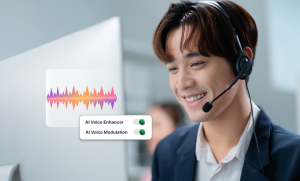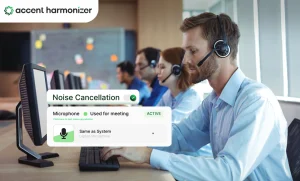

A contact center can make a call quieter and still make it harder to understand. Noise suppression can remove keyboards, HVAC, traffic, household sounds, and office chatter—but aggressive processing can also clip consonants, suppress low-volume speech, or fail when another human voice overlaps the agent. “Noise cancellation” is not a useful buying criterion by itself. The buyer needs to know what the software removes, what it preserves, and how it behaves on a real agent call.
What Agent-side Noise Suppression Does?
To understand where intervention occurs, trace the signal path from the user to the destination:
| Real-Time Voice & Accent Processing Data Path |
|---|
Agent Voice & Unwanted Sound → Microphone Input → Noise-Suppression & Accent Layer → Softphone / CCaaS Interface → Customer Audio Endpoint |
Effective deployments require separating three distinct layers that buyers frequently confuse during procurement evaluations.
- Headset / microphone filtering: Reduces what gets captured in the first place through physical proximity and hardware directional properties.
- Software noise suppression: Processes unwanted environmental sound that still reaches the digital audio stream via algorithm attenuation.
- Bidirectional processing: May also clean competing noise entering from the customer side of the conversation simultaneously.
Headsets and software are not automatically substitutes. They operate at entirely different points in the audio chain and must be balanced rather than stacked blindly.
The Hard Part Is Separating Noise From Speech
“Background noise” is not one technical problem. Different acoustic signatures impose vastly different mathematical challenges on processing pipelines.
| Acoustic Noise Processing Challenge | ||
|---|---|---|
| Sound Entering the Call | Relative Challenge | Acoustic Driver / Why |
| HVAC / Fan | Lower | Stable, repetitive stationary signal. |
| Keyboard Clicks | Moderate | Short, non-stationary transient bursts. |
| Traffic / Construction | Moderate | Variable, dynamic environmental noise. |
| TV / Music | Higher | Complex audio containing speech-like formant frequencies. |
| Nearby Agent | High | Competing human speech directly resembles target agent voice. |
| Multiple Nearby Agents | Very High | Multiple overlapping human voice signals causing acoustic confusion. |
Standard background noise removal for call centers handles predictable continuous tones well, but dense environments demand advanced capabilities. AI-powered voice isolation tools for call centers work smoothly in these situations. Within large-scale BPO operations, noise suppression software filters out background chatter and preserves voice clarity.
When Noise Suppression Makes the Agent Harder to Understand?
Common processing failures destroy audio intelligibility long before they register as background noise:
- clipped initial consonants
- missing word endings
- muffled soft speech
- unnatural gating
- robotic artifacts
- damaged names
- distorted numbers
Consider a live interaction where an agent verifies billing details:
Real-Time Voice Clarification Sample
“Your balance is fourteen sixty.”
System Output: Processed via Accent Harmonizer (Sub-150ms Latency)
If processing clips the opening consonant, the customer may hear the wrong number even though the background chatter disappeared entirely. Noise suppression should be evaluated by what remains intelligible after processing, not by how quiet the audio sounds.
Fix the Right Layer Before You Buy Software
Enterprise engineering teams must follow a strict diagnostic ladder before acquiring additional software licenses.
- Environment: Is the problem coming from desk spacing, HVAC, room reflection, or a dense floor?
- Microphone: Check boom position, gain, headset quality, and whether the wrong input device is active.
- Software: Use speech and noise suppression tools for agents when unwanted sound is still entering the captured signal.
- Audio / network path: If the problem is clipping, jitter, dropouts, or instability, investigate transport and device configuration.
Do not buy noise-suppression software to solve a network problem. Once the failure is confirmed as unwanted captured sound, software evaluation becomes relevant.
How to Evaluate Noise-suppression Software for a Contact Center?
Selecting noise cancelling software for call center deployments requires rigorous vendor interrogation against production conditions.
| Accent Processing Software Buyer Evaluation Checklist | |
|---|---|
| Evaluation Criterion | What the Buyer Should Ask |
| Competing speech suppression | Can it reduce another human voice, not just fans and keyboards? |
| Speech preservation | Does it clip consonants, numbers, names, or low-volume speech? |
| Agent-side vs. bidirectional | Which audio streams does it actually process? |
| Latency | Does processing interfere with natural turn-taking? |
| CCaaS fit | How does it sit inside the existing softphone/audio path? |
| Endpoint footprint | What CPU and memory does it consume? |
| Device consistency | Does performance vary across approved headsets? |
| Data handling | Where is audio processed and what is retained? |
| Administration | Can IT manage it across hundreds or thousands of endpoints? |
| Failure behavior | What happens if the software stops processing audio? |
Do not accept a quiet-room demonstration. Ask the vendor to test at least steady HVAC or fan noise, keyboard or transient sounds, and nearby human speech. Listen closely to remaining chatter, clipped consonants, word loss, metallic or robotic artifacts, and processing delay.
When the Problem Isn’t Noise
If a customer states, “I can hear people talking behind you,” that points directly toward environmental interference resolved by suppression tooling. However, if the call audio sounds clean but the customer repeatedly asks for clarification, the issue involves pronunciation, articulation, accent familiarity, or speech intelligibility.
Noise suppression removes interference around the agent’s speech. Accent Harmonizer addresses speech characteristics within the voice signal that may affect cross-accent comprehension without altering the speaker’s core identity or emotional tone.
The best noise-suppression software is the one that removes the actual noise without clipping your agents speech, adding noticeable delay, or creating another failure point in the call path. Test it against real floor conditions, especially competing human speech, before treating AI-based claims as proof of operational readiness.
Is Noise Removal Clipping Your Agent’s Dynamic Speech?
Eliminating background chatter shouldn’t come at the cost of clipped consonants, robotic voice artifacts, or dropped numbers. When background silence still leads to repeat clarification requests, your voice stack needs more than static filters.
Accent Harmonizer integrates real-time noise cancellation and speech accent translation directly at the endpoint—preserving natural speech intelligibility without adding latency or compromising data compliance.
- On-device zero-retention audio processing engine
- Centralized VDI and CCaaS virtual audio driver deployment
- Measurable reduction in clarification requests and Average Handle Time (AHT)
Schedule a technical review for Accent Harmonizer