
The business case for accent harmonization is easier to understand than the deployment question.
If customers repeatedly ask agents to repeat themselves, those extra seconds do not remain a communication problem for long. They accumulate inside Average Handle Time (AHT), consume agent capacity, trigger avoidable escalations, and make an offshore delivery model more expensive than its staffing plan assumed.
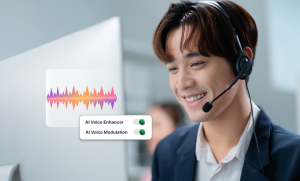
Accent harmonization integration enables real-time speech processing in the call path. The advance system lets contact center manage workflow without redesigning SIP routing, replacing CCaaS platform or refreshing hardware.
Accent Harmonization Integration Is an Architecture Decision
When a platform quotes “integrates with your existing contact center,” a CTO or contact-center architect needs to know what the software touches. Real-time speech processing can theoretically be inserted at several points:
| Speech Processing Models & Enterprise Architectural Concerns | ||
|---|---|---|
| Processing Model | Where Speech Processing Occurs | Typical Architectural Concern |
| Telephony Layer | Inside or adjacent to the centralized voice path | Changes to routing, telephony configuration, testing, and rollback may be required |
| Network or Hosted Processing Layer | Audio is sent through an external processing path | Network dependency, latency, security, and audio-data movement require scrutiny |
| Endpoint Audio Layer | Speech is processed on or through the agent endpoint before entering the existing calling application | Endpoint deployment, audio-device configuration, compatibility, and local resource usage become primary concerns |
Where Accent Harmonizer Sits in the Voice Stack?
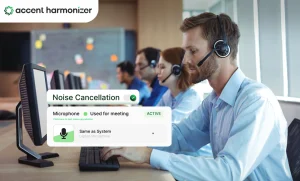
Accent Harmonizer, powered by Sanas, operates as a virtual audio layer within the agent’s existing desktop environment. At a simplified level, the path looks like this:
| Accent Harmonizer Real-Time Voice Integration Architecture |
|---|
Source Agent Microphone → Processing Accent Harmonizer Virtual Audio Device → Transport Existing Softphone or CCaaS App → Endpoint Customer |
The application receives audio from the user’s physical headset, while the calling application is configured to use virtual audio or microphone as input. The contact-center platform receives normal audio input device. Speech processing happens before that audio is passed into the calling application.
Accent Harmonizer does not replace:
- the CCaaS platform,
- the SIP trunk,
- the carrier,
- the CRM,
- the agent desktop workflow,
- or the physical headset estate
Accent Harmonizer works as a lightweight virtual audio device and operates within existing contact-center and telephony environment.
What Changes During Integration and What Should Not?
A useful deployment discussion separates the systems that need modification from the systems that should remain untouched.
What changes?
At the endpoint level, the deployment may involve:
- installing the Accent Harmonizer,
- assigning or provisioning users,
- configuring the physical headset as the application’s microphone source,
- presenting the virtual audio device to the calling application,
- applying organization or group-level settings,
- validating authentication,
- running test calls,
- and deploying the configuration across the selected agent population
What should not need to change?
The integration model is intended to avoid turning speech clarity into a telephony redesign. Implementation should be evaluated specifically for whether it avoids changes to:
- call-routing logic,
- SIP trunks,
- carrier configurations,
- contact-center queues,
- CRM workflows,
- IVR logic,
- or core CCaaS architecture.
Why the Virtual Audio Device Model Matters?
The customer asks for repetition and agent repeats it. The interaction grows longer without moving any closer to resolution. Accent Harmonizer is trying to solve this operational problem inside the conversation.
Across one call, the delay may look insignificant. With thousands of calls, repeated clarification becomes paid capacity. It creates a strong incentive for Operations to fix the problem.
But putting another component inside the centralized production voice path can create a completely different cost: engineering effort, integration testing, security review, change controls, failure handling, and rollback planning.
Measuring Conversational Latency in Real-Time Speech Processing
Raw inference benchmarks (e.g., sub-200ms) do not guarantee fluid conversation dynamics. True latency testing must measure mouth-to-ear delays and turn-taking behavior across real production environments rather than isolated model performance.
Every real-time voice modification tool introduces processing latency. While vendor specifications like Omind’s Accent Harmonizer target processing delays under 200 milliseconds while preserving vocal identity, tone, and emotion, enterprise buyers must evaluate total latency as a human interaction metric rather than a standalone lab benchmark.
Evaluating End-to-End Latency Impact on Agent-Customer Turn-Taking
Synthetic lab benchmarks fail to capture how latency compounding alters natural conversation flow. Evaluating speech processing delay requires auditing the full production stack:
| Total Conversational Latency Breakdown |
|---|
Metric Total Conversational Latency = Layer 1 Hardware/Driver Buffer + Layer 2 Inference Processing Time + Layer 3 Network Transmission Delay |
Key Factors Disrupting Real-time Speech Dynamics
- Turn-Taking Disruption: Additional delay causes agents and customers to speak over one another or encounter awkward, unnatural pauses.
- Speech Cadence Extremes: Fast talkers and rapid back-and-forth exchanges increase speech frame overlaps and buffer queuing.
- Utterance Length Variations: Variable-length phrases strain adaptive jitter buffers, altering audio pacing mid-sentence.
- Hardware and Peripheral Overhead: Local USB headset drivers, Bluetooth audio codecs, and legacy virtual desktop interfaces (VDI) add compounding millisecond delays.
- Environment and Infrastructure Constraints: Browser-based WebRTC clients, thick softphones, and local network packet loss degrade real-time stream execution.
Executing a Conversational Proof-of-Concept (POC) Latency Audit
Rather than asking “How fast is the AI model?”, enterprise evaluations must answer: “Does the fully deployed configuration alter natural turn-taking behavior during live calls?”
| Low-Latency Pipeline Workflow of Real-Time Voice Architecture |
|---|
Stage 1 Agent Audio Input → Stage 2 Driver Buffer → Core Processing Local AI Processing → Stage 4 Network Transmission → Endpoint Customer Audio Output |
Recommended POC Testing Steps
- Stress-Test Rapid Speech Sequences: Conduct test scenarios featuring fast speakers and frequent interjections to verify packet processing under heavy load.
- Audit Real Production Hardware: Test exclusively on standard-issue agent endpoint devices, approved headset models, and production softphone configurations.
- Simulate Non-Ideal Network Conditions: Introduce realistic network jitter, packet loss, and bandwidth throttling to observe fallback behavior and audio degradation.
- Monitor Emotional and Tonal Fidelity: Confirm that voice identity, pitch modulation, and natural prosody remain stable under varying system loads.
Auditing Live Audio Handling Architecture and Critical Security Vectors
Any software interacting with live customer speech automatically triggers intense security and compliance scrutiny. To eliminate procurement, drag and clear InfoSec reviews, technical buyers must establish precise operational answers across these core security parameters:
- Audio Capture Interface: Pinpoint the exact physical microphone driver or virtual audio endpoint capturing raw speech.
- Speech Processing Location: Verify whether inference executes on local endpoint hardware (edge) or inside a cloud/VPC environment.
- Endpoint Boundary Rules: Confirm whether unencrypted audio frames ever leave the physical or virtual local machine.
- Volatile Memory Buffering: Inspect short-term RAM buffer retention thresholds during live stream processing.
- Persistent Storage Creation: Ensure no local disk writes or permanent audio recordings are generated during sessions.
- Telemetry Data Scope: Audit all system performance metrics transmitted to external monitoring servers.
- Log Anonymization Protocols: Verify that system logs omit Personally Identifiable Information (PII) and user tracking IDs.
- Post-Session Data Retention: Confirm strict zero-data-retention parameters immediately after call termination.
- Administrative Access Control: Review Role-Based Access Control (RBAC) governing management dashboards and configuration settings.
- Update & Authentication Security: Inspect codesigning, token validation, and Over-The-Air (OTA) software deployment mechanics.
| Omind Accent Harmonizer Deployment Architecture | |||
|---|---|---|---|
| Vendor | Declared Audio Processing Architecture | Deployment Flexibility | Procurement Risk Profile |
| Omind (Accent Harmonizer) | Real-time processing without audio storage or PII retention. | Offers native on-device processing for regulated environments. | Low Risk: On-device isolation prevents external data movement. |
Making Speech Clarity an Operational Advantage
Integrating real-time speech processing into a contact center voice stack should solve operational friction.
The virtual audio device model offers a clear advantage on architecture, latency, and data security. By operating directly at the endpoint, Accent Harmonizer resolves customer-agent comprehension gaps directly in the conversation loop. Contact centers achieve immediate reductions in Average Handle Time (AHT) and customer effort without modifying SIP routing, touching core CCaaS queues, or triggering months of telephony regression testing.
For contact center architects and CTOs, real-time accent harmonization proves that you don’t need to overhaul your entire voice stack to transform agent capacity and customer experience. By keeping the deployment lightweight and centered at the endpoint, enterprise teams can unlock global delivery models and measurable operational savings from day one.
Reduce Speech Friction Without Rebuilding Your Contact Center Stack
See how Accent Harmonizer can be deployed across your existing voice environment while keeping core telephony, agent workflows, and routing intact.